Investors & Settings
Set up who is in the plan, their income, tax rates, savings room, pensions, and retirement lifestyle.
- Subscription Settings (General)
- Manage Investors — Personal, Income & Tax, Savings, Pensions
- Monthly Retirement Expenses
- Life Stages & Travel
Subscription Settings (General)
These settings apply to all investors and scenarios in your account. Configure them first, before creating investor profiles.
Path: Investors → Subscription Settings (General)
| Field | What it does |
|---|---|
| Province | Used for combined federal + provincial tax calculations. Choose the province where you reside. Tax brackets are fetched from the CRA and applied automatically. |
| Inflation Rate (%) | Annual rate at which prices and costs are assumed to rise. The default of 3.5% is a common long-term planning figure. All future monthly expenses and withdrawal targets are inflated by this rate. |
| Rebalance Frequency | How often the engine rebalances holdings back to target allocation — monthly, quarterly, or annually. More frequent rebalancing keeps risk aligned but generates more trades. |
Manage Investors
Each investor represents a person in the plan — typically you and/or a spouse/partner. Add as many as apply to your household.
Path: Investors → Manage Investors
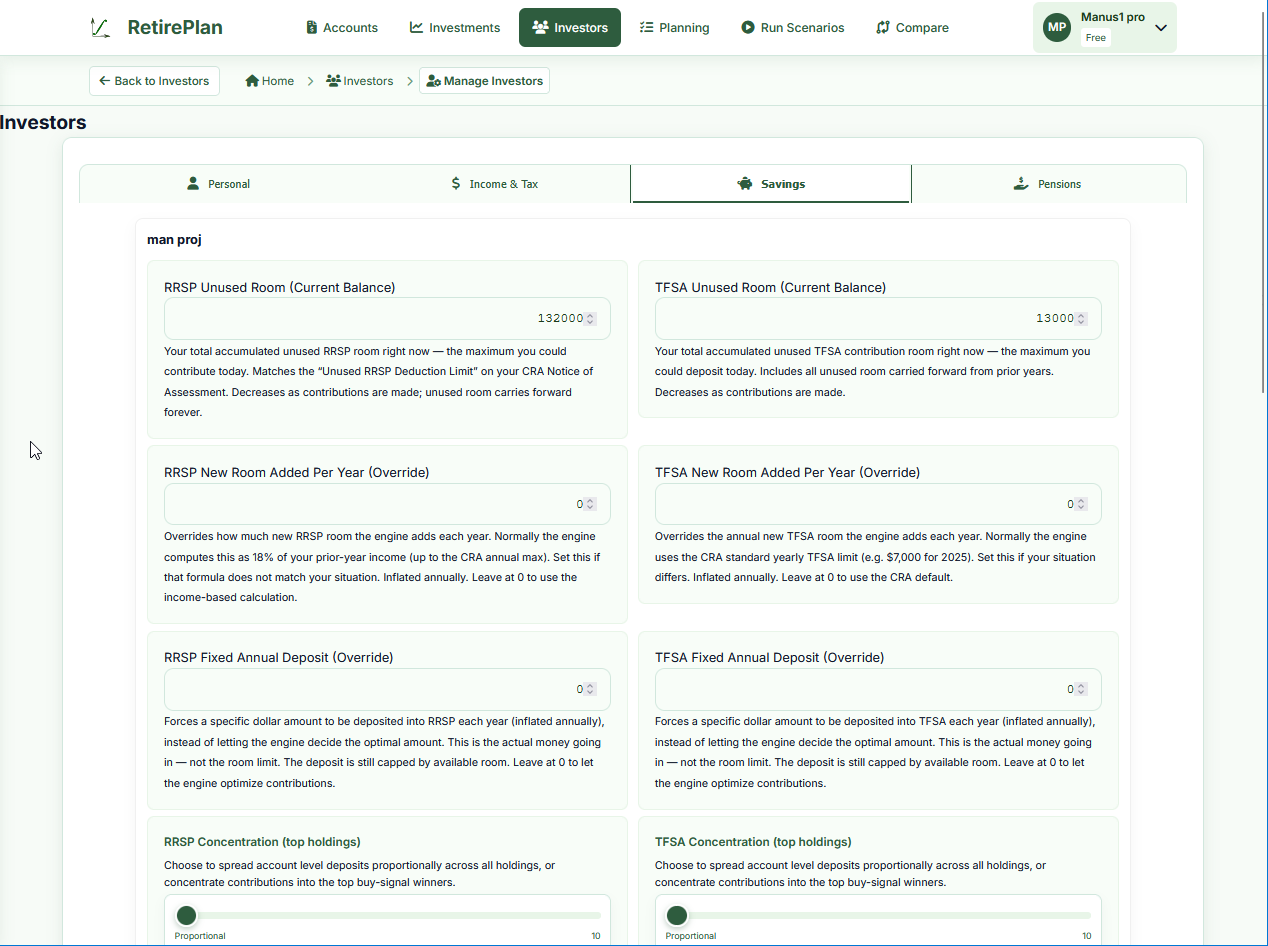
Personal tab
| Field | Notes |
|---|---|
| Name | Used to label accounts, holdings, and reports. |
| Date of Birth | Drives age calculations for retirement, CPP/OAS start, and RRIF conversion. |
| Retirement Age | Age at which this investor stops working and the plan switches from accumulation to withdrawal phase. |
| Life Expectancy | Planning horizon. The projection runs until the last surviving investor's life expectancy age. A common planning figure is 90–95. |
| Risk Tolerance (1–10) | Affects how the engine classifies your portfolio risk and some risk-based withdrawal strategies. 1 = very conservative, 10 = very aggressive. |
Income & Tax tab
| Field | Notes |
|---|---|
| Annual Income ($) | Pre-tax employment or business income. Used to calculate RRSP room and to auto-calculate marginal tax rate. |
| Marginal Tax Rate (%) | The rate applied to the next dollar of income. Used throughout the projection for RRSP withdrawals, RRIF payments, and employment income. Click "Calculate Tax Rate" to auto-fill this from your province and income, or enter the value from your last tax return. |
| Medical Insurance (%) | If your employer covers medical premiums, enter what percentage you pay. Used to model healthcare cost increases in retirement. |
Savings tab
| Field | Notes |
|---|---|
| RRSP Unused Room (Current Balance) | Your accumulated unused RRSP room right now — the maximum you could contribute today. Find this on your CRA Notice of Assessment as "Unused RRSP Deduction Limit". Decreases as you contribute; unused room carries forward forever. |
| TFSA Unused Room (Current Balance) | Accumulated unused TFSA contribution room — includes all years you were eligible but didn't fully contribute. Available on CRA My Account. |
| RRSP New Room Added Per Year (Override) | Normally the engine calculates new RRSP room as 18% of prior-year income (up to the CRA annual max). Override only if your situation differs (e.g., defined benefit pension reduces your room). Leave at 0 to use the calculated amount. |
| TFSA New Room Added Per Year (Override) | The CRA adds a fixed amount of TFSA room each year (e.g., $7,000 in 2025). Override if your situation differs. Leave at 0 to use the CRA default. |
| RRSP / TFSA Fixed Annual Deposit (Override) | Forces a specific deposit into this account type each year, instead of letting the engine decide the optimal split. Leave at 0 for automatic optimization. |
| RRSP / TFSA Concentration | Slider from Proportional to Concentrate (top 10 holdings). "Proportional" spreads new contributions evenly across all holdings. "Concentrate" puts all new money into whichever holding has the strongest recent performance signal. |
Pensions tab
| Field | Notes |
|---|---|
| CPP Monthly at 65 ($) | Your estimated CPP (Canada Pension Plan) payment if taken at age 65. Find your estimate on My Service Canada Account (search "CPP Statement of Contributions"). The engine adjusts for early/late start ages in scenario settings. |
| OAS Monthly at 65 ($) | Your estimated OAS (Old Age Security) payment at 65 — currently approximately $700–$750/month for someone with a full 40-year Canadian residence history. The engine handles deferral bonuses and clawback thresholds automatically. |
| Defined Benefit Pension | If you have an employer DB pension, enter the monthly amount, start age, and whether it's indexed to inflation. The engine adds this as income in the withdrawal phase. |

Monthly Retirement Expenses
Path: Investors → Retirement Expenses
Enter your estimated monthly spending in retirement, broken down by category (housing, food, transportation, entertainment, etc.). This total becomes the monthly withdrawal target the engine tries to maintain in the withdrawal phase.
- The engine inflates these amounts annually at the inflation rate you set in General Settings
- Life Stages can scale the total up or down per phase (e.g., 100% in Active, 80% in Slow Down)
- Travel costs entered in Life Stages are added on top of this base amount
Life Stages & Travel
Path: Investors → Life Stages
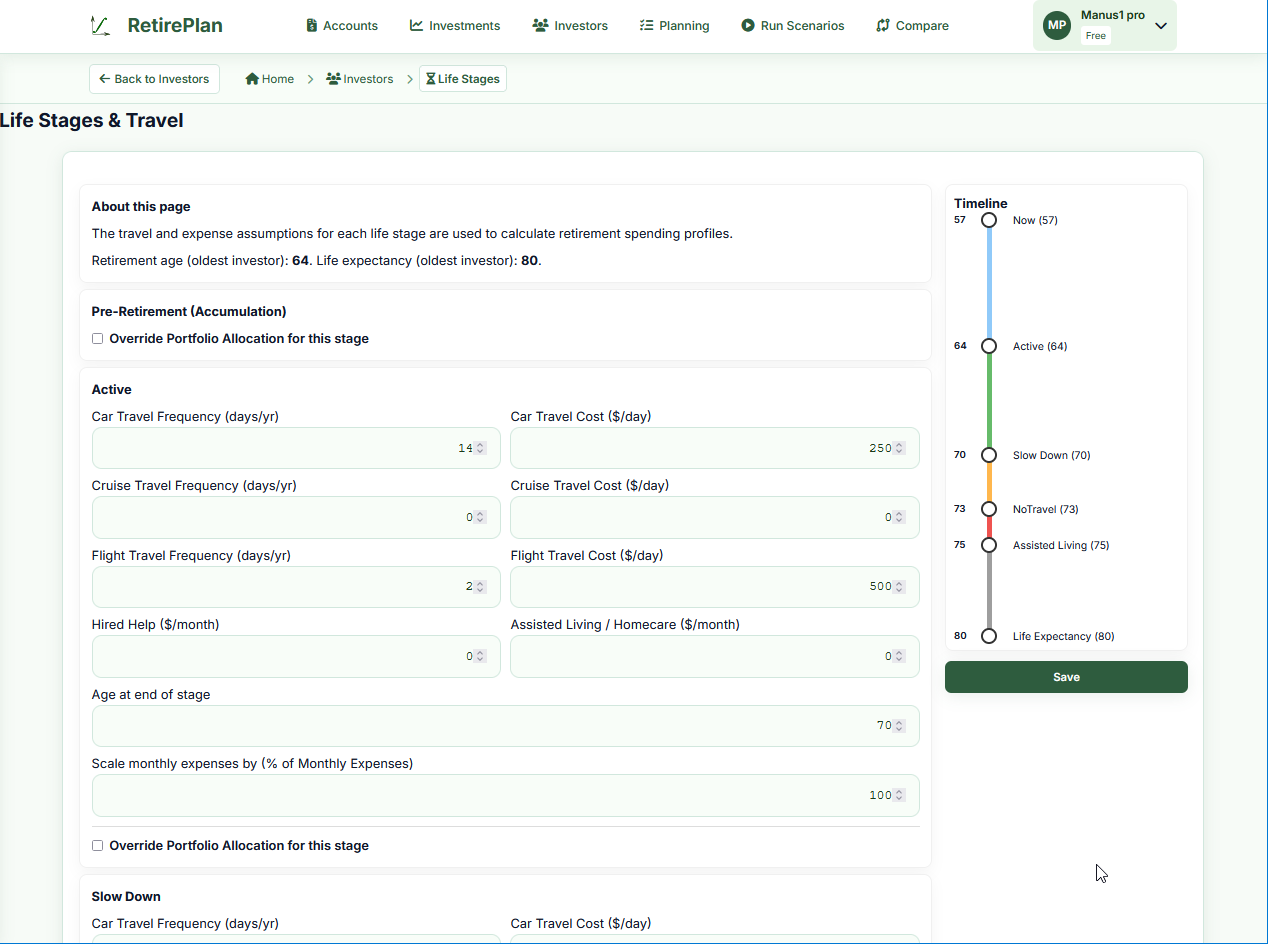
Retirement is not a single period. RetirePlan models five distinct phases, each with its own spending and travel profile:
| Stage | Typical characteristics |
|---|---|
| Pre-Retirement (Accumulation) | Still working; accumulating savings. Monthly expenses come from income, not the portfolio. Optional: override portfolio allocation for this phase. |
| Active | First years of retirement. Full energy, active travel. Enter car trip days, cruise days, and flight days per year with a cost per day. |
| Slow Down | Reduced travel and activity. Scale monthly expenses as a percentage of base (e.g., 90%). |
| No Travel | Staying close to home. Travel costs drop to near zero. |
| Assisted Living | Care and homecare costs. Enter monthly amounts for Hired Help and Assisted Living / Homecare. |
The right-hand timeline shows when each stage starts and ends based on the ages you enter. The engine transitions automatically at the specified ages.
Travel Cost Fields
| Field | Notes |
|---|---|
| Car Travel Frequency (days/yr) | Days per year spent on road trips. A typical Canadian road trip is 7–14 days. |
| Car Travel Cost ($/day) | All-in cost per day (fuel, accommodation, food). A modest road trip might be $150–$300/day for two people. |
| Cruise Travel Frequency (days/yr) | Days aboard cruise ships per year. |
| Cruise Travel Cost ($/day) | All-in cost per day including fees, excursions, gratuities. Often $200–$500+/day. |
| Flight Travel Frequency (days/yr) | Days of air travel trips per year (total days away, not flights). |
| Flight Travel Cost ($/day) | All-in cost per day including airfare amortized over trip duration, hotels, meals. |
| Age at end of stage | When this phase ends and the next one begins. |
| Scale monthly expenses by (%) | Multiplier for your base monthly expense budget in this phase. 100% = full budget, 80% = 20% less. |