Getting Started
Set up your plan from scratch in about 15 minutes.
🗺 Overview — What You're Building
RetirePlan is a Canadian retirement projection tool. You model your financial life across several phases — pre-retirement, active retirement, slow-down, no-travel, and assisted living — and the engine projects your portfolio month by month through each phase.
Here's what you'll configure, in order:
- Investors — who is covered by the plan (you and/or a spouse)
- Subscription settings — province, inflation, rebalance frequency
- Life Stages — travel and expense levels across retirement phases
- Monthly Expenses — what you spend in retirement
- Financial Vehicles — the investments held in your accounts (stocks, ETFs, bonds, etc.)
- Accounts — RRSP, TFSA, Non-Registered, etc. and what holdings are in each
- A Scenario — monthly contribution amount, retirement ages, withdrawal strategy, and other options
- Run — press Run and read the projection report
Step-by-step Setup
Configure Subscription Settings
Before anything else, set your province and the inflation rate assumption. These affect every calculation in the plan.
- Select your province (used for combined federal + provincial tax calculations)
- Set inflation rate (default 3.5% is a common planning assumption)
- Set rebalancing frequency (monthly, quarterly, or annual)
Set Up Investor Profiles
Add yourself and, if applicable, your spouse or partner. Each investor has their own income, tax rate, savings room, and government benefit estimates.
- Personal tab: name, date of birth, retirement age, life expectancy, risk tolerance
- Income & Tax tab: annual income, marginal tax rate — click Calculate Tax Rate to auto-fill from your province and income
- Savings tab: RRSP/TFSA contribution room remaining
- Pensions tab: CPP and OAS monthly amounts at 65, defined benefit pension if applicable
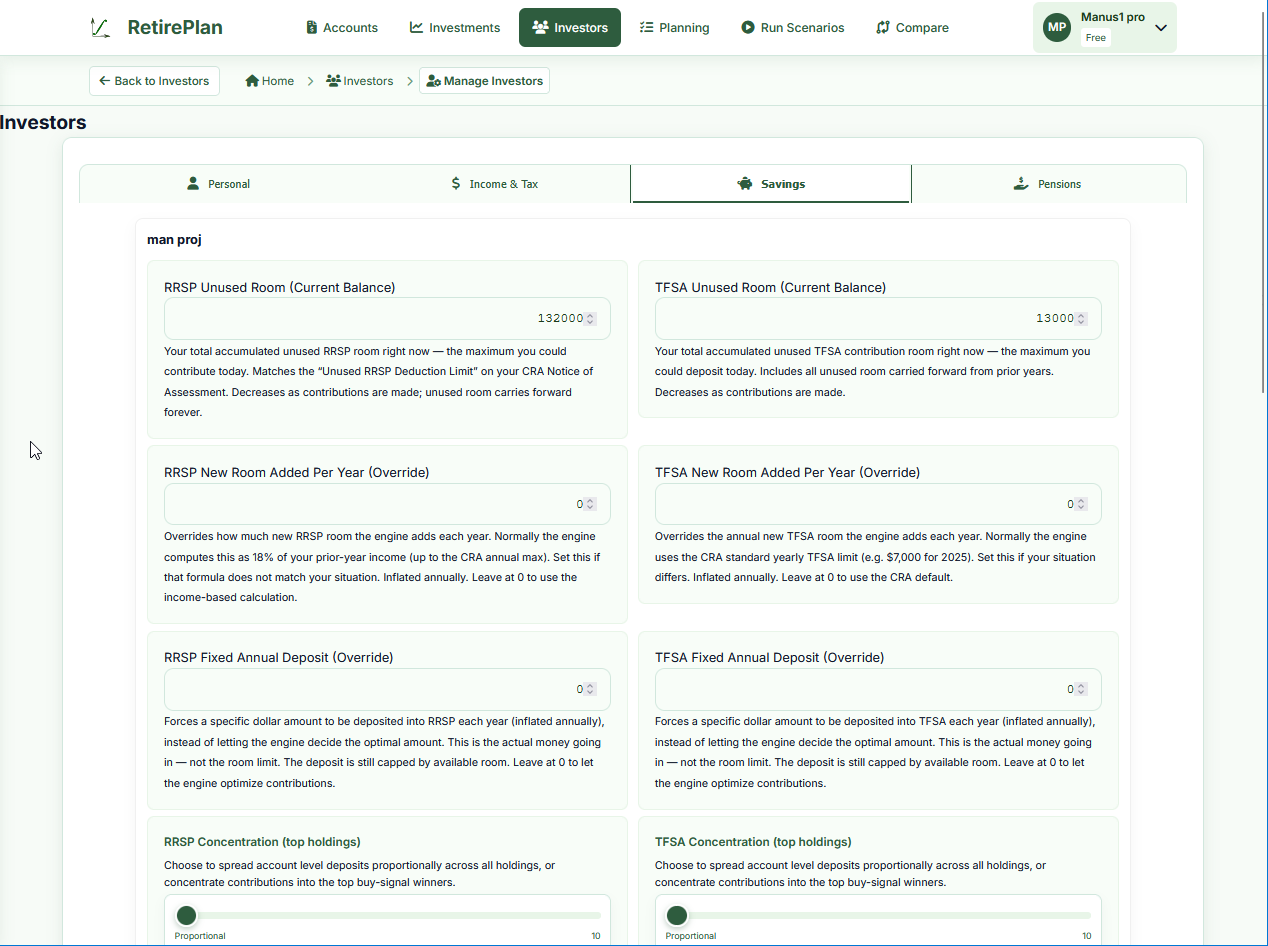 Go to Manage Investors →

Set Monthly Retirement Expenses
Enter your estimated monthly spending in retirement. This becomes the withdrawal target the engine tries to meet each month.
- Break down expenses into categories (housing, food, transport, medical, etc.)
- The total is your base monthly budget — Life Stages can scale it up or down for each phase
Configure Life Stages & Travel
Retirement isn't uniform. Early on you might travel extensively; later you'll slow down. Life Stages let you define each phase and set different travel and expense levels.
- Active — the first years of retirement: set car/cruise/flight travel days and costs per year
- Slow Down — you do less; scale expenses as a % of your base monthly budget
- No Travel — home-based retirement
- Assisted Living — care costs; enter $/month for hired help or homecare
- Set the age at which each stage ends using the stage timeline on the right
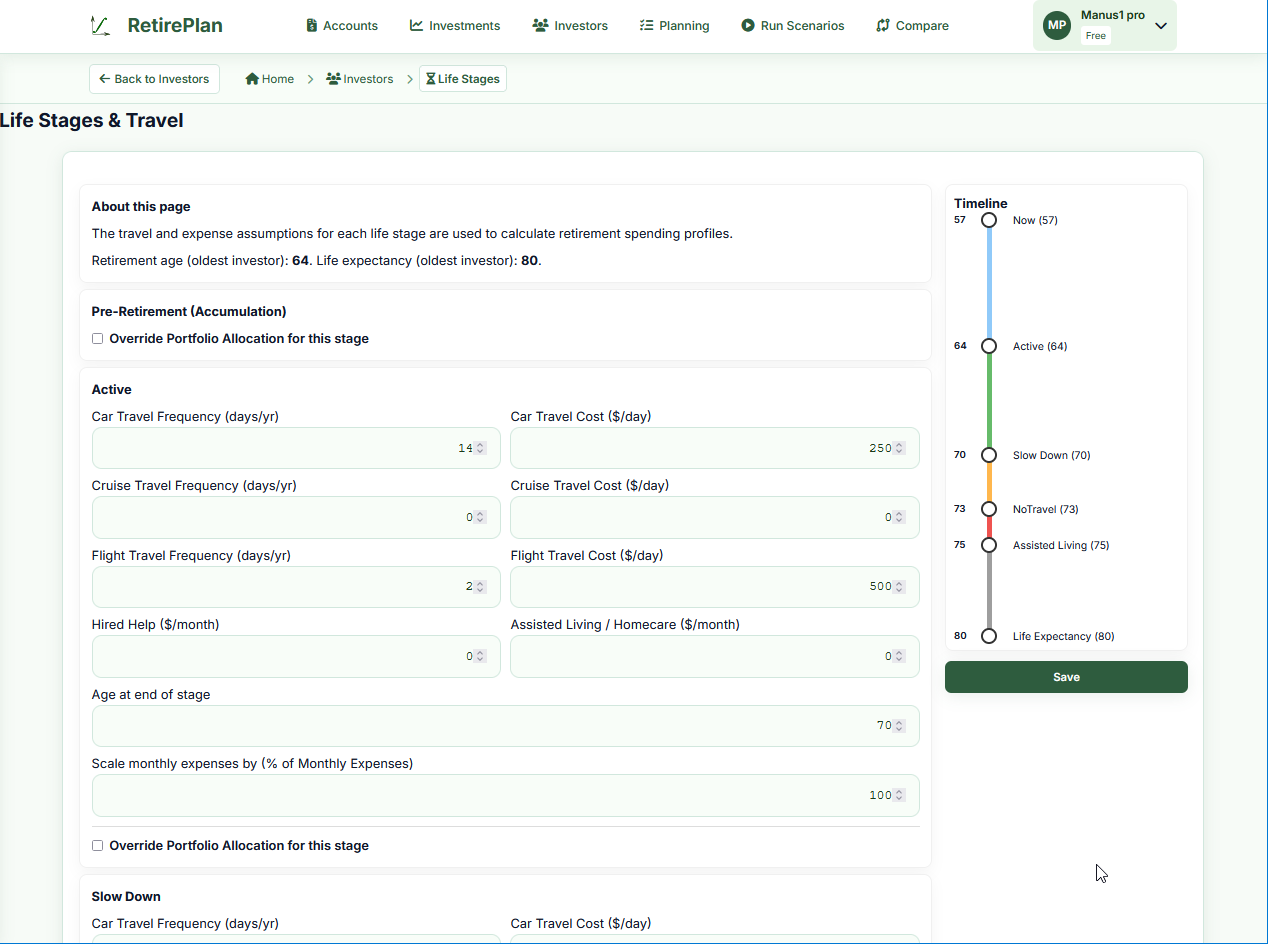 Go to Life Stages →
Add Financial Vehicles
Vehicles are the actual investments you hold — stocks, ETFs, mutual funds, bonds, and cash. Before you can set up accounts and holdings, the vehicles need to exist.
- Enter a ticker symbol and click Search to auto-populate details for publicly traded securities (e.g., XDIV.TO, ENB.TO)
- For mutual funds or investments without public data, create a vehicle with a made-up symbol and enter manual returns
- Use CASH and BOND-X.XX% for cash and fixed-rate bond vehicles
- For vehicles that track an index, set the Close Mirror field (e.g., mirror ^GSPC for S&P 500)


Create Accounts and Add Holdings
Create your actual investment accounts (RRSP, TFSA, Non-Registered, etc.) and add the holdings (which vehicles you hold, how many shares, at what current value).
- Click Add Account under the investor it belongs to
- Choose the account type (RRSP, TFSA, Spousal RRSP, Non-Registered, etc.)
- Open the account and add holdings: select the vehicle, enter current value or share count
- Repeat for each account you own
Create a Scenario and Run
A scenario ties everything together. It defines how much you deposit monthly, when you retire, and how your savings are withdrawn. The scenario projects your plan forward from today using your current account balances.
- Before you start: Make sure your accounts on the Investments page show your current balances and share counts (as of today)
- Click New Scenario and give it a name
- Set the Monthly Deposit (how much you plan to save each month before retirement)
- Select a Withdrawal Strategy (e.g., proportional, tax-optimized)
- Enable or adjust the 4% Rule if you want a sustainable withdrawal limit
- Click Run to generate a month-by-month projection from today forward
 Go to Planning →
Full Scenarios guide
Go to Planning →
Full Scenarios guide

Read Your Results
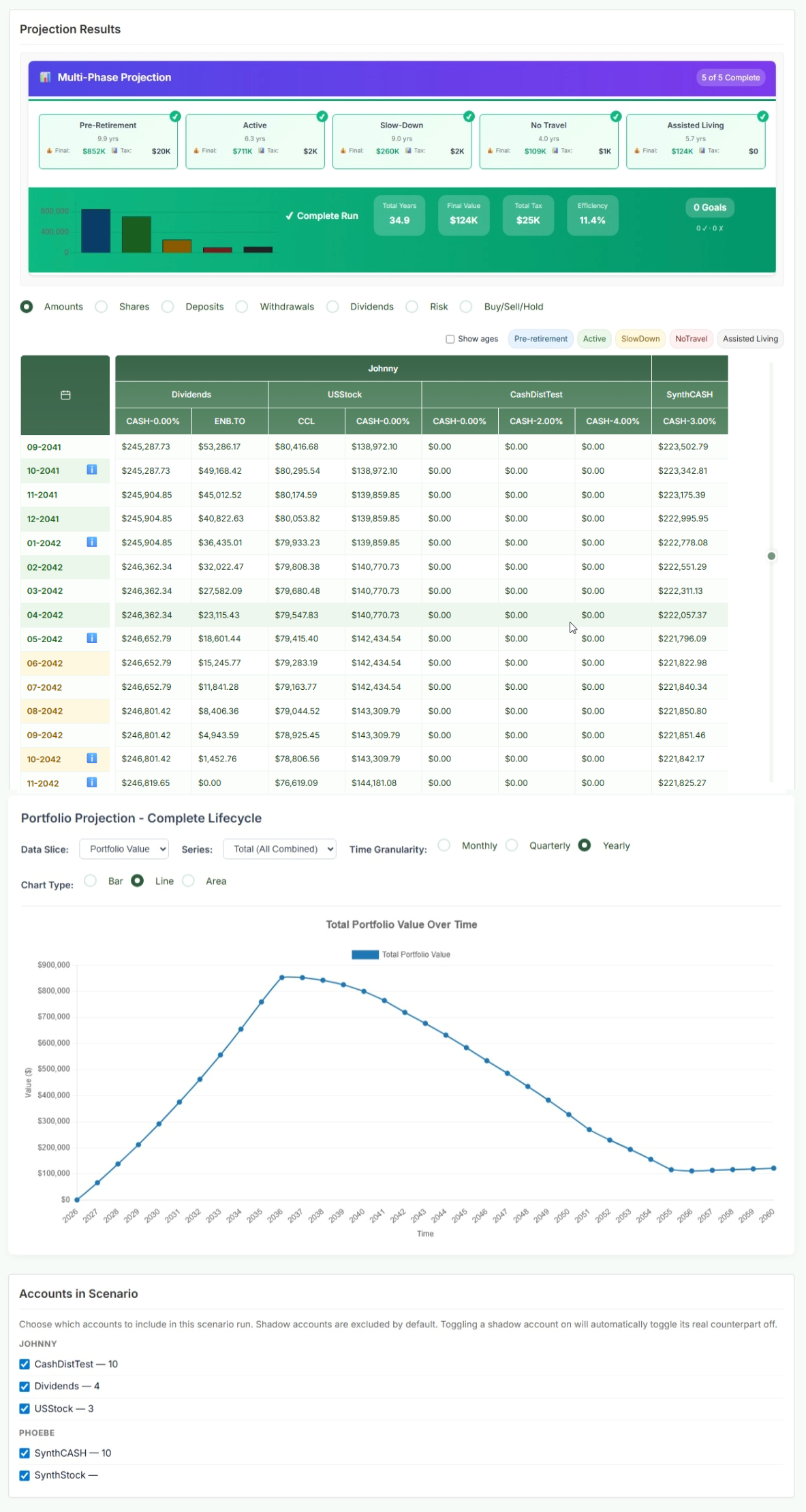
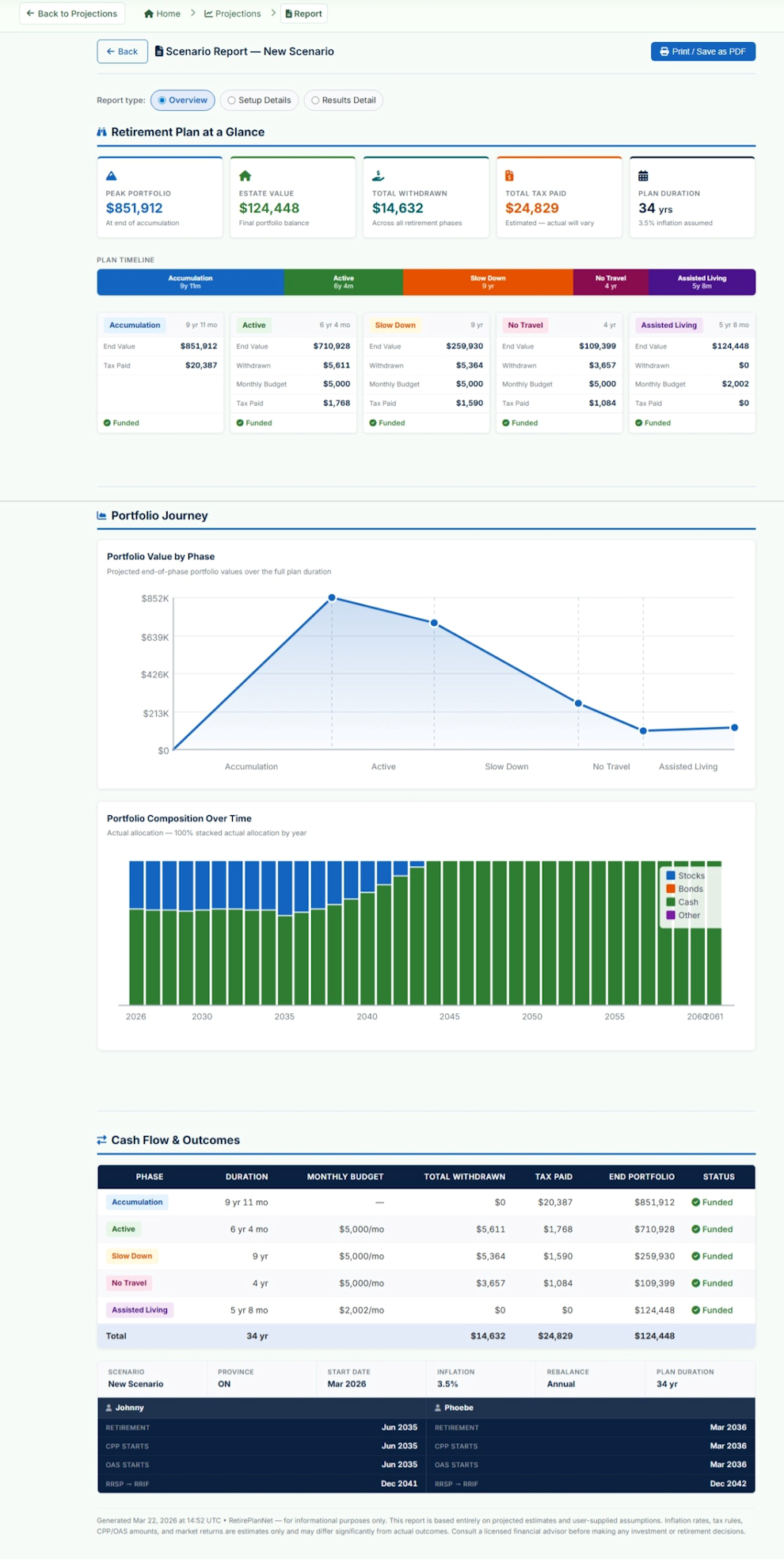
After running, review the projection report. It shows your portfolio month by month through each life stage, total taxes paid, monthly withdrawals, and whether the plan is fully funded — all projected forward from today.
- The Multi-Phase Projection bar at the top shows each phase's duration and projected end-of-phase value
- Click each phase to see the data grid for that period (Month 0 = today; Month 1 = next month, etc.)
- Use the Portfolio Projection chart to visualize how your portfolio could grow month by month from today onward
- Click Report to get a printable PDF summary
- Click Export CSV to download raw data for spreadsheet analysis
 Read the Reports guide →
✅ Quick-start Checklist
- Province and inflation set in Subscription Settings
- At least one investor profile created (Personal, Income & Tax, Savings tabs filled)
- CPP and OAS monthly amounts entered (Pensions tab)
- Monthly retirement expenses configured
- Life stages set with travel costs and stage-end ages
- Financial vehicles created (at least one for each holding you own)
- Accounts created and holdings added
- One scenario created and run successfully