Goals & Debts
Track savings goals and model how your loans interact with retirement savings.
Financial Goals
Path: Planning → Goals
Goals let you set a specific savings target — a house down payment, education fund, vacation, emergency fund, or any other objective. The engine tracks progress toward each goal across your projection and flags goals that are at risk of not being reached.
Goal Types
Creating a Goal
- Go to Planning → Goals
- Click Add Goal
- Enter a name, type, and Target Amount
- Set a Target Date — when you need the money
- Optionally enter a Current Saved Amount (what you've already set aside)
- Set a Monthly Contribution if you're actively saving toward this goal
- Click Save
Goal Fields
| Field | Notes |
|---|---|
| Target Amount ($) | The total amount you need to reach the goal. Enter today's dollars; the engine inflates it to the target date using the subscription inflation rate. |
| Target Date | When you need the funds. Goals before retirement are treated as pre-retirement targets; goals after are modeled as retirement withdrawals. |
| Current Saved Amount ($) | How much you've already saved specifically for this goal. This is progress already made. |
| Monthly Contribution ($) | Regular monthly contribution toward this goal. This is deducted from the scenario's monthly deposit pool available for other investments. |
| Priority | If multiple goals compete for the same funds, higher-priority goals are funded first. |
Goal Status
The Goals Overview shows each goal's status:
- Active — on track; projected savings will meet the target
- Reached — goal has been met
- At Risk — projected savings fall short of the target; consider increasing contribution or adjusting the target date

Debt Paydown
Path: Planning → Debts
Enter your current loans to model how they interact with your retirement savings. RetirePlan does not give financial advice — it runs the numbers so you can answer "what if I pay my mortgage faster vs. invest that extra money?"
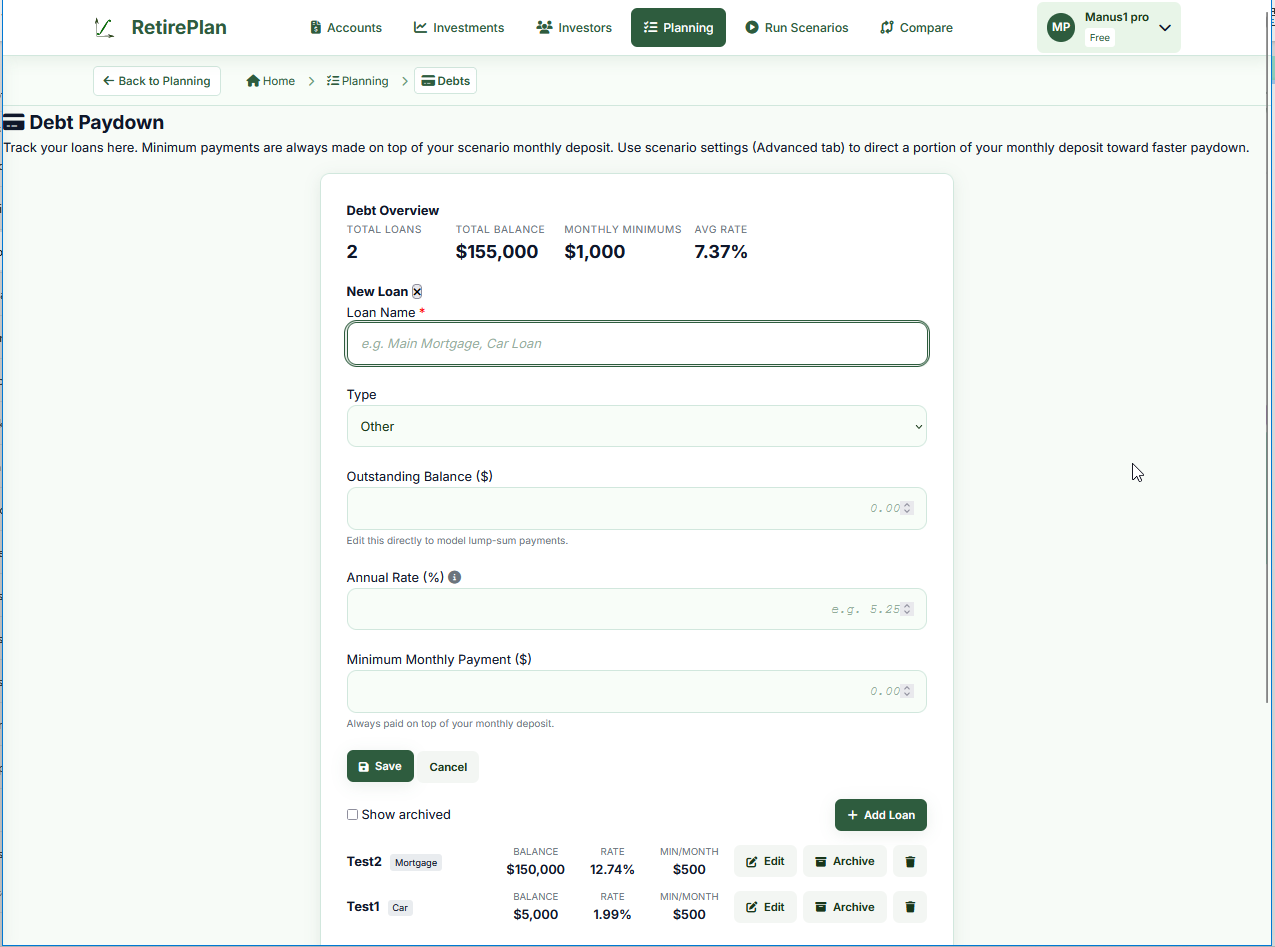
Adding a Loan
- Click + Add Loan
- Enter a descriptive name (e.g., "Main Mortgage", "Car Loan")
- Select the Loan Type — this affects the compounding method (mortgages use semi-annual compounding per Canadian law; other loans use monthly)
- Enter the Outstanding Balance — the amount currently owed
- Enter the Annual Rate (%) — your current interest rate
- Enter the Minimum Monthly Payment
- Click Save
Loan Fields
| Field | Notes |
|---|---|
| Name | Any descriptive label. Appears in scenario messages and reports. |
| Type | Mortgage, Car, Education, Line of Credit, Credit Card, Retail. Each type uses the standard Canadian compounding method for that product. |
| Outstanding Balance ($) | Current amount owed. To model a lump-sum prepayment, simply reduce this number. The engine resumes from the new balance — no separate "prepayment" field is needed. |
| Annual Rate (%) | Your current interest rate. Variable-rate loans are modeled at this fixed rate for the projection period. Update this field as rates change and re-run. |
| Minimum Monthly Payment ($) | Your required monthly payment. Minimum payments are always made on top of your monthly deposit — they don't reduce the amount going into investments. |
Debt Paydown Strategies
You can direct a portion of your monthly savings deposit toward accelerated debt repayment using the Debt Acceleration slider in the scenario's Advanced settings.
Avalanche (Highest Rate First) Mathematically optimal
Extra payments go to the highest-interest loan first. Minimizes total interest paid over the life of all loans. Best choice if minimizing total cost is the goal.
Snowball (Largest Payment First)
Extra payments go to the loan with the largest minimum payment first. Frees up more monthly cash flow sooner by eliminating large payments. Useful if you want psychological wins from paying off big obligations.
Even Split
Extra payments are spread proportionally across all active loans. A middle-ground approach that reduces all balances simultaneously.
Roll-On-Completion
When a loan is fully paid off, what happens to the freed-up monthly payment? The slider controls this:
- 100% to investments (right) — the full freed payment goes to growing your portfolio. Recommended for maximizing wealth.
- 100% to next debt (left) — snowball/avalanche cascades to the next remaining loan
- Split — a proportional mix
How Debt Appears in the Projection
The engine adds debt payment messages to the projection timeline:
- When a loan is paid off mid-accumulation: "Car Loan paid off. $500/month reallocated to investments."
- When a loan is fully paid: "All loans paid. $1,000/month redirected to investments."
- If a loan continues into retirement: "Main Mortgage continues into retirement. $1,800/month deducted from withdrawal budget."
Cash Flow in the Model
Minimum payments come on top of your monthly deposit — they don't reduce how much you invest. Only the acceleration percentage (which you set) reduces the invested amount in exchange for faster debt paydown.